AI Product Design

0→1 Product

Interaction Design

Creator Tools

CueOver

Creating an AI-powered streaming experience that brings live audience conversations into the stream.

Industry

Creator Technology / AI / Streaming

Role

Founder
Product Designer

Timeline

2+ months (Ongoing)

Challenge

Challenge

Streamers are constantly trying to engage with their audience while simultaneously playing games, talking to viewers and managing their broadcast. Twitch chat is an important part of that interaction, but reading and responding to messages creates a constant attention gap between the streamer and their audience.

I wanted to explore how AI could close that gap. Not by replacing the streamer’s interaction with chat, but by helping the right audience moments become part of the stream itself.

Solution

Solution

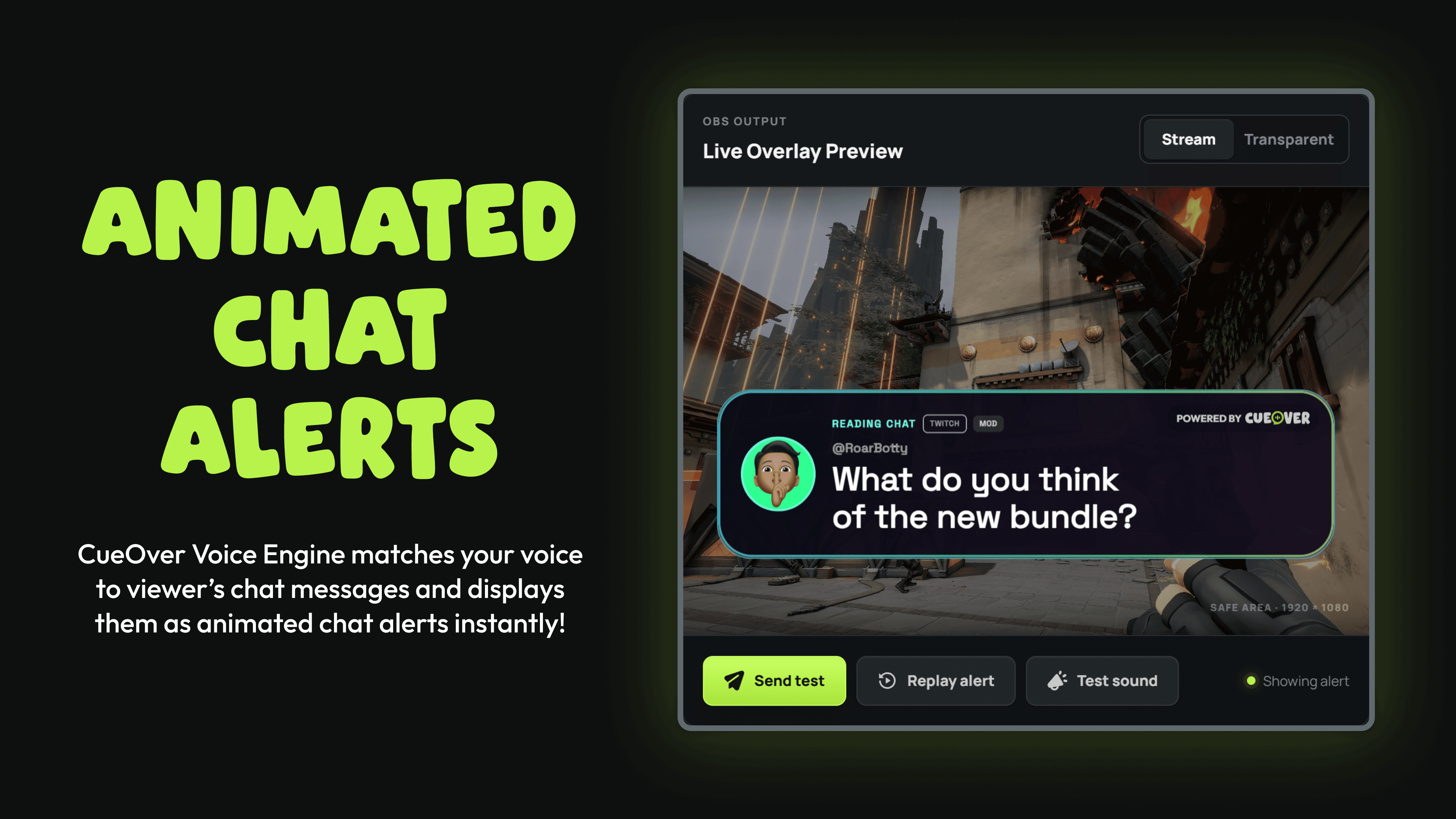
I designed and built CueOver, an AI-powered streaming tool that listens to a streamer's voice, understands what they're responding to and matches it against live Twitch chat in real time. When a match is detected, the relevant message is surfaced as an animated on-stream alert through OBS.

The experience combines real-time speech recognition, voice matching, chat analysis and configurable visual alerts into a simple workflow for streamers. I designed the product end-to-end, from the initial concept and interaction model through the web experience, desktop application, overlay system, onboarding, account experience and visual identity.

Outcome

Outcome

CueOver evolved from an early product concept into a working AI-powered streaming product, with a complete experience spanning the streamer dashboard, live studio, voice engine, Twitch integration and OBS overlay.

The project also became an opportunity to explore how AI can move beyond traditional chatbots and recommendations to create real-time, context-aware interactions between people and their audiences.

Let's dig deeper.

Turning chat into part of the show

Streamers constantly move between their game, their audience and the conversation happening in chat.
But when a streamer reads a message aloud, viewers often have no idea which message they're responding to.
I saw an opportunity to turn that moment of interaction into part of the stream itself.
What began as a product idea became an opportunity to explore a different way of working as a product designer by combining product strategy, design, prototyping, development and AI into one continuous process.

Building With AI

I utilise AI throughout my current product design workflow rather than simply as a development tool. It helps me with research, PRDs, user flows, brainstorming, edge cases, prototyping and implementation.

I refine the visual design and interaction details before feeding those decisions back into the product.
Figma → Codex → Product → Figma → Codex → Product
Figma
Product design and visual refinement
Codex
Product exploration, development and iteration.
GitHub
Version control and collaboration

Supabase
Authentication, database and backend services
Resend
Transactional emails
Netlify
Deployment and hosting
Cloudflare
Infrastructure and delivery

From Designer to Builder

When you're responsible for getting something working, you start thinking beyond the screen.
How does this actually behave?
What does it connect to?
What technology makes this possible?
Where will it break?
What constraints will shape the experience?
Understanding those questions earlier makes the design stronger, I'm able to explore feasibility alongside the experience and make more informed product decisions.
Prototype early. Question assumptions. Commit deliberately.

The Core Experience

The product is built around a real-time voice-to-chat matching loop.
1. Connect
Link your Twitch channel and chat.
2. Listen
CueOver listens to the streamer's microphone while they talk.
3. Understand
Speech is transcribed in real time.
4. Match
CueOver compares the transcript against recent chat messages.
5. Trigger
When a match reaches the required confidence, the corresponding message becomes an alert.
6. Show
The alert appears in the stream through an OBS Browser Source.
The complexity happens behind the scenes.
The streamer's experience should feel almost effortless.

Mapping the Experience

Each step introduced its own product questions.
What happens when the match isn't confident?
What happens when two messages are similar?
How quickly does the alert need to appear?
What happens when speech recognition gets something wrong?
What does the streamer see while the system is listening?
Mapping these scenarios early helped turn a simple concept into a product that could operate in the messy reality of a live stream.

Designing the Live Studio

The Live Studio became the operational centre of CueOver.
It needed to bring several complex systems together without making the streamer feel like they were operating a control room.
The experience brings together:

  • Twitch connection
  • Live chat
  • Voice detection
  • Match sensitivity
  • Alert previews
  • Overlay configuration
  • OBS integration
The design challenge was finding the right balance between visibility and simplicity.
Streamers need to know what the system is doing, but they shouldn't need to understand how the underlying technology works.
The Live Studio became the operational centre of CueOver.
It needed to bring several complex systems together without making the streamer feel like they were operating a control room.
The experience brings together:

  • Twitch connection
  • Live chat
  • Voice detection
  • Match sensitivity
  • Alert previews
  • Overlay configuration
  • OBS integration
The design challenge was finding the right balance between visibility and simplicity.
Streamers need to know what the system is doing, but they shouldn't need to understand how the underlying technology works.

Designing the Alert Experience

The alert is the payoff.
It's the moment where a hidden interaction becomes visible to the audience.
The Live Studio supports customisation of all the chat alert elements including:

  • Animation
  • Sound
  • Avatar
  • Username
  • Message
  • Badges
  • Pronouns
  • Typography
  • Font size
  • Line spacing
  • Background
  • Chat bubbles
This allows the user the opportunity create an alert that matches their own stream identities.
The alert is the payoff.
It's the moment where a hidden interaction becomes visible to the audience.
The Live Studio supports customisation of all the chat alert elements including:

  • Animation
  • Sound
  • Avatar
  • Username
  • Message
  • Badges
  • Pronouns
  • Typography
  • Font size
  • Line spacing
  • Background
  • Chat bubbles
This allows the user the opportunity create an alert that matches their own stream identities.

Proving Value Before Monetising

The free tier was deliberately designed to provide the complete core CueOver experience.

The core technology shouldn't be the paywall.
The voice engine is what makes CueOver useful.
No account required.
No payment required.
No artificial limitation on the core interaction.
The visual experience is what makes CueOver personal.
The Pro Tier focuses on the parts creators care about when making their stream feel unique:
  • No CueOver watermark
  • Premium themes
  • Premium animations
  • Premium alert tones
  • Custom alert tone uploads
  • Future premium effects and features
This creates a natural progression:
Free = Make chat part of your stream.
Pro = Make it feel like your stream.
The free tier was deliberately designed to provide the complete core CueOver experience.

The core technology shouldn't be the paywall.
The voice engine is what makes CueOver useful.
No account required.
No payment required.
No artificial limitation on the core interaction.
The visual experience is what makes CueOver personal.
The Pro Tier focuses on the parts creators care about when making their stream feel unique:
  • No CueOver watermark
  • Premium themes
  • Premium animations
  • Premium alert tones
  • Custom alert tone uploads
  • Future premium effects and features
This creates a natural progression:
Free = Make chat part of your stream.
Pro = Make it feel like your stream.
For launch, I introduced a founding-member offer designed to create urgency without permanently discounting the product.
The founding price is $9/month or $79/year, available until 1 January 2027 or the first 500 Pro subscribers. The price remains locked for founding members while their subscription stays active.
Get the first creators through the door, learn from them and build an early paying community.
For launch, I introduced a founding-member offer designed to create urgency without permanently discounting the product.
The founding price is $9/month or $79/year, available until 1 January 2027 or the first 500 Pro subscribers. The price remains locked for founding members while their subscription stays active.
Get the first creators through the door, learn from them and build an early paying community.

From MVP to Product

CueOver started with one hypothesis, Can we make the conversation between streamers and their audience part of the show?
The MVP proved the interaction.
The free tier lets creators experience the value.
Pro turns that value into a personalised streaming experience.
And the roadmap creates opportunities to expand CueOver from a single alert product into a broader engagement platform.
I didn't just design CueOver. I designed the product, the business model and the system that allows it to grow.

Like what you see?

© 2026 Christopher Ng